
79 KiB
GRDB Associations
- Associations Benefits
- Required Protocols
- The Types of Associations
- Associations and the Database Schema
- Building Requests from Associations
- Fetching Values from Associations
- Association Aggregates
- DerivableRequest Protocol
- Known Issues
- Future Directions
Associations Benefits
An association is a connection between two Record types.
Associations streamline common operations in your code, make them safer, and more efficient. For example, consider a library application that has two record types, author and book:
struct Author {
    var id: Int64
    var name: String
}

struct Book {
    var id: Int64
    var authorId: Int64?
    var title: String
}
Now, suppose we wanted to load all books from an existing author. We'd need to do something like this:
let author: Author = ...
let books = try Book
    .filter(Column("authorId") == author.id)
    .fetchAll(db)
Or, loading all pairs of books along with their authors:
struct BookInfo {
    var book: Book
    var author: Author?
}

let books = try Book.fetchAll(db)
let bookInfos = books.map { book -> BookInfo in
    let author = try Author.fetchOne(db, key: book.authorId)
    return BookInfo(book: book, author: author)
}
With GRDB associations, we can streamline these operations (and others), by declaring the connections between books and authors. Here is how we define associations, and properties that access them:
extension Author {
    static let books = hasMany(Book.self)
    var books: QueryInterfaceRequest<Book> {
        return request(for: Author.books)
    }
}

extension Book {
    static let author = belongsTo(Author.self)
    var author: QueryInterfaceRequest<Author> {
        return request(for: Book.author)
    }
}
Loading all books from an existing author is now easier:
let books = try author.books.fetchAll(db)
As for loading all pairs of books and authors, it is not only easier, but also far much efficient:
struct BookInfo: FetchableRecord, Decodable {
    let book: Book
    let author: Author?
}

let request = Book.including(optional: Book.author)
let bookInfos = BookInfo.fetchAll(db, request)
Before we dive in, please remember that associations can not generate all possible SQL queries that involve several tables. You may also prefer writing SQL, and this is just OK, because your SQL skills are welcome: see the Joined Queries Support chapter.
Required Protocols
Associations are available on types that adopt the necessary supporting protocols.
When your type is a subclass of the Record class, all necessary protocols are already setup and ready.
Otherwise:
-
TableRecord is the protocol that lets you declare associations between record types:
extension Author: TableRecord { static let books = hasMany(Book.self) } extension Book: TableRecord { static let author = belongsTo(Author.self) } -
EncodableRecord makes it possible to use the
request(for:)method, as below:extension Book: EncodableRecord { // The request which fetches the book's author. var author: QueryInterfaceRequest<Author> { return request(for: Book.author) } } // Let's fetch a book's author: try dbQueue.read { db in let book: Book = ... let author = try book.author.fetchOne(db) // Author? }A record type often conforms to EncodableRecord via the PersistableRecord protocol. However, PersistableRecord grants persistence methods, the ones that are able to insert, update, and delete rows in the database. When you'd rather keep a record type read-only, and yet profit from associations, all you need is EncodableRecord.
EncodableRecord conformance can be derived from the standard Encodable protocol. See Codable Records for more information.
The Types of Associations
GRDB handles five types of associations:
- BelongsTo
- HasMany
- HasOne
- HasManyThrough
- HasOneThrough
An association declares a link from a record type to another, as in "one book belongs to its author". It instructs GRDB to use the foreign keys declared in the database as support for Swift methods.
Each one of the three types of associations is appropriate for a particular database situation.
- BelongsTo
- HasMany
- HasOne
- HasManyThrough
- HasOneThrough
- Choosing Between BelongsTo and HasOne
- Self Joins
BelongsTo
The BelongsTo association sets up a one-to-one connection from a record type to another record type, such as each instance of the declaring record "belongs to" an instance of the other record.
For example, if your application includes authors and books, and each book is assigned its author, you'd declare the Book.author association as below, with its companion property:
struct Book: TableRecord, EncodableRecord {
    static let author = belongsTo(Author.self)
    var author: QueryInterfaceRequest<Author> {
        return request(for: Book.author)
    }
    ...
}

struct Author: TableRecord {
    ...
}
The static Book.author association will help you build association requests. The property lets you fetch a book's author:
let book: Book = ...
let author = try book.author.fetchOne(db) // Author?
The BelongsTo association between a book and its author needs that the database table for books has a column that points to the table for authors:
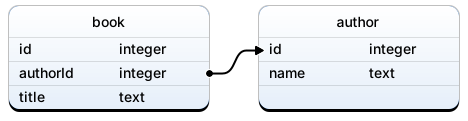
See Convention for the BelongsTo Association for some sample code that defines the database schema for such an association.
HasMany
The HasMany association indicates a one-to-many connection between two record types, such as each instance of the declaring record "has many" instances of the other record. You'll often find this association on the other side of a BelongsTo association.
For example, if your application includes authors and books, and each author is assigned zero or more books, you'd declare the Author.books association as below, with its companion property:
struct Author: TableRecord, EncodableRecord {
    static let books = hasMany(Book.self)
    var books: QueryInterfaceRequest<Book> {
        return request(for: Author.books)
    }
}

struct Book: TableRecord {
    ...
}
The static Author.books association will help you build association requests. The property lets you fetch an author's books:
let author: Author = ...
let books = try author.books.fetchAll(db) // [Book]
The HasMany association between an author and its books needs that the database table for books has a column that points to the table for authors:
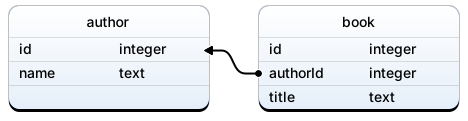
See Convention for the HasMany Association for some sample code that defines the database schema for such an association.
HasOne
The HasOne association, like BelongsTo, sets up a one-to-one connection from a record type to another record type, but with different semantics, and underlying database schema. It is usually used when an entity has been denormalized into two database tables.
For example, if your application has one database table for countries, and another for their demographic profiles, you'd declare the Country.demographics association as below, with its companion property:
struct Country: TableRecord, EncodableRecord {
    static let demographics = hasOne(Demographics.self)
    var demographics: QueryInterfaceRequest<Demographics> {
        return request(for: Country.demographics)
    }
    ...
}

struct Demographics: TableRecord {
    ...
}
The static Country.demographics association will help you build association requests. The property lets you fetch a country's demographic profile:
let country: Country = ...
let demographics = try country.demographics.fetchOne(db) // Demographics?
The HasOne association between a country and its demographics needs that the database table for demographics has a column that points to the table for countries:
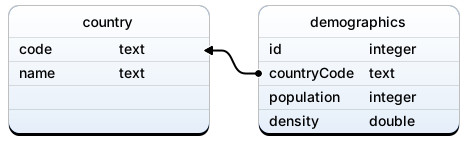
See Convention for the HasOne Association for some sample code that defines the database schema for such an association.
HasManyThrough
The HasManyThrough association is often used to set up a many-to-many connection with another record. This association indicates that the declaring record can be matched with zero or more instances of another record by proceeding through a third record. For example, consider the practice of passport delivery. The relevant association declarations could look like this:
struct Country: TableRecord, EncodableRecord {
    static let passports = hasMany(Passport.self)
    static let citizens = hasMany(Citizen.self, through: passports, using: Passport.citizen)
    var citizens: QueryInterfaceRequest<Citizen> {
        return request(for: Country.citizens)
    }
}

struct Passport: TableRecord {
    static let country = belongsTo(Country.self)
    static let citizen = belongsTo(Citizen.self)
}

struct Citizen: TableRecord, EncodableRecord {
    static let passports = hasMany(Passport.self)
    static let countries = hasMany(Country.self, through: passports, using: Passport.country)
    var countries: QueryInterfaceRequest<Country> {
        return request(for: Citizen.countries)
    }
}
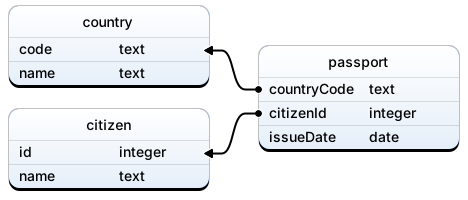
The static Country.citizens association will help you build association requests. The property lets you fetch a country's citizens:
let country: Country = ...
let citizens = try country.citizens.fetchAll(db) // [Citizen]
The HasManyThrough association is also useful for setting up "shortcuts" through nested HasMany associations. For example, if a document has many sections, and a section has many paragraphs, you may sometimes want to get a simple collection of all paragraphs in the document. You could set that up this way:
struct Document: TableRecord {
    static let sections = hasMany(Section.self)
    static let paragraphs = hasMany(Paragraph.self, through: sections, using: Section.paragraphs)
}

struct Section: TableRecord {
    static let paragraphs = hasMany(Paragraph.self)
}

struct Paragraph: TableRecord {
}
As in the examples above, HasManyThrough association is always built from two other associations: the through: and using: arguments. Those associations can be any other association (BelongsTo, HasMany, HasManyThrough, etc). The above Document.paragraphs association can also be defined, in a much more explicit way, as below:
struct Document: TableRecord {
    static let paragraphs = hasMany(
        Paragraph.self,
        through: Document.hasMany(Section.self),
        using: Section.hasMany(Paragraph.self))
}
HasOneThrough
A HasOneThrough association sets up a one-to-one connection with another record. This association indicates that the declaring record can be matched with one instance of another record by proceeding through a third record. For example, if each book belongs to a library, and each library has one address, then one knows where the book should be returned to:
struct Book: TableRecord, EncodableRecord {
    static let library = belongsTo(Library.self)
    static let returnAddress = hasOne(Address.self, through: library, using: library.address)
    var returnAddress: QueryInterfaceRequest<Address> {
        return request(for: Book.returnAddress)
    }
}

struct Library: TableRecord {
    static let address = hasOne(Address.self)
}

struct Address: TableRecord {
}
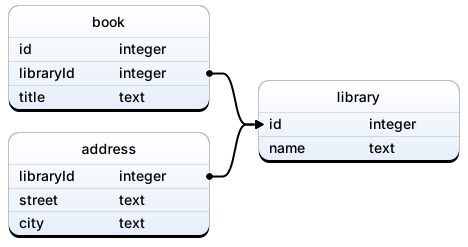
The static Book.returnAddress association will help you build association requests. The property lets you fetch a book's return address:
let book: Book = ...
let address = try book.returnAddress.fetchOne(db) // Address?
As in the example above, HasOneThrough association is always built from two other associations: the through: and using: arguments. Those associations can be any other association to one (BelongsTo, HasOne, HasOneThrough). The above Book.returnAddress association can also be defined, in a much more explicit way, as below:
struct Book: TableRecord {
    static let returnAddress = hasOne(
        Address.self,
        through: Book.belongsTo(Library.self),
        using: Library.hasOne(Address.self))
}
Choosing Between BelongsTo and HasOne
When you want to set up a one-to-one relationship between two record types, you'll need to add a BelongsTo association to one, and a HasOne association to the other. How do you know which is which?
The distinction is in where you place the database foreign key. The record that points to the other one has the BelongsTo association. The other record has the HasOne association:
A country has one demographic profile, a demographic profile belongs to a country:
struct Country: TableRecord, FetchableRecord {
    static let demographics = hasOne(Demographics.self)
    ...
}

struct Demographics: TableRecord, FetchableRecord {
    static let country = belongsTo(Country.self)
    ...
}
Self Joins
When designing your data model, you will sometimes find a record that should have a relation to itself. For example, you may want to store all employees in a single database table, but be able to trace relationships such as between manager and subordinates. This situation can be modeled with self-joining associations:
struct Employee {
    static let subordinates = hasMany(Employee.self)
    static let manager = belongsTo(Employee.self)
}
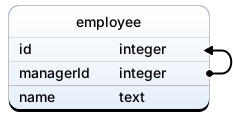
The matching migration would look like:
migrator.registerMigration("Employees") { db in
    try db.create(table: "employee") { t in
        t.autoIncrementedPrimaryKey("id")
        t.column("managerId", .integer)
            .indexed()
            .references("employee", onDelete: .restrict)
        t.column("name", .text)
    }
}
Associations and the Database Schema
Associations are grounded in the database schema, the way database tables are defined.
For example, a BelongsTo association between a book and its author needs that the database table for books has a column that points to the table for authors.
GRDB also comes with several conventions for defining your database schema.
Those conventions help associations be convenient and, generally, "just work". When you can't, or don't want to follow conventions, you will have to override the expected defaults in your Swift code.
- Convention for Database Table Names
- Convention for the BelongsTo Association
- Convention for the HasMany Association
- Convention for the HasOne Association
- Foreign Keys
Convention for Database Table Names
Database table names should be singular and camel-cased.
Make them look like Swift identifiers: book, author, postalAddress.
This convention helps fetching values from associations. It is used, for example, in the sample code below, where we load all pairs of books along with their authors:
// The Author record
struct Author: FetchableRecord, TableRecord {
}

// The Book record
struct Book: FetchableRecord, TableRecord {
    static let author = belongsTo(Author.self)
}

// A pair made of a book and its author
struct BookInfo: FetchableRecord, Decodable {
    let book: Book
    let author: Author?
}

let request = Book.including(optional: Book.author)
let bookInfos = BookInfo.fetchAll(db, request)
This sample code only works if the database table for authors is called "author". The name "author" is the key that helps BookInfo initialize its author property. For your convenience, "author" is also the default value of the Author.databaseTableName property (see the TableRecord protocol).
If the database schema does not follow this convention, and has, for example, database tables named with plural names (authors and books), you can still use associations. But you need to help row consumption by providing the required key:
// Setup for customized table names

struct Author: FetchableRecord, TableRecord {
    // Customized table name
    static let databaseTableName = "authors"
}

struct Book: FetchableRecord, TableRecord {
    // Customized table name
    static let databaseTableName = "books"

    // Explicit association key
    static let author = belongsTo(Author.self, key: "author")
}
See The Structure of a Joined Request for more information.
Convention for the BelongsTo Association
extension Book: TableRecord, EncodableRecord {
    static let author = belongsTo(Author.self)
    var author: QueryInterfaceRequest<Author> {
        return request(for: Book.author)
    }
}
Here is the recommended migration for the BelongsTo association:
migrator.registerMigration("Books and Authors") { db in
    try db.create(table: "author") { t in
        t.autoIncrementedPrimaryKey("id")             // (1)
        t.column("name", .text)
    }
    try db.create(table: "book") { t in
        t.autoIncrementedPrimaryKey("id")
        t.column("authorId", .integer)                // (2)
            .notNull()                                // (3)
            .indexed()                                // (4)
            .references("author", onDelete: .cascade) // (5)
        t.column("title", .text)
    }
}
- The
authortable has a primary key. - The
book.authorIdcolumn is used to link a book to the author it belongs to. - Make the
book.authorIdcolumn not null if you want SQLite to guarantee that all books have an author. - Create an index on the
book.authorIdcolumn in order to ease the selection of an author's books. - Create a foreign key from
book.authorIdcolumn toauthors.id, so that SQLite guarantees that no book refers to a missing author. TheonDelete: .cascadeoption has SQLite automatically delete all of an author's books when that author is deleted. See Foreign Key Actions for more information.
The example above uses auto-incremented primary keys. But generally speaking, all primary keys are supported.
Following this convention lets you write, for example:
struct Book: FetchableRecord, TableRecord {
    static let author = belongsTo(Author.self)
}

struct Author: FetchableRecord, TableRecord {
}
If the database schema does not follow this convention, and does not define foreign keys between tables, you can still use BelongsTo associations. But your help is needed to define the missing foreign key:
struct Book: FetchableRecord, TableRecord {
    static let author = belongsTo(Author.self, using: ForeignKey(...))
}
See Foreign Keys for more information.
Convention for the HasMany Association
extension Author: TableRecord, EncodableRecord {
    static let books = hasMany(Book.self)
    var books: QueryInterfaceRequest<Book> {
        return request(for: Author.books)
    }
}
Here is the recommended migration for the HasMany association:
migrator.registerMigration("Books and Authors") { db in
    try db.create(table: "author") { t in
        t.autoIncrementedPrimaryKey("id")             // (1)
        t.column("name", .text)
    }
    try db.create(table: "book") { t in
        t.autoIncrementedPrimaryKey("id")
        t.column("authorId", .integer)                // (2)
            .notNull()                                // (3)
            .indexed()                                // (4)
            .references("author", onDelete: .cascade) // (5)
        t.column("title", .text)
    }
}
- The
authortable has a primary key. - The
book.authorIdcolumn is used to link a book to the author it belongs to. - Make the
book.authorIdcolumn not null if you want SQLite to guarantee that all books have an author. - Create an index on the
book.authorIdcolumn in order to ease the selection of an author's books. - Create a foreign key from
book.authorIdcolumn toauthors.id, so that SQLite guarantees that no book refers to a missing author. TheonDelete: .cascadeoption has SQLite automatically delete all of an author's books when that author is deleted. See Foreign Key Actions for more information.
The example above uses auto-incremented primary keys. But generally speaking, all primary keys are supported.
Following this convention lets you write, for example:
struct Book: FetchableRecord, TableRecord {
}

struct Author: FetchableRecord, TableRecord {
    static let books = hasMany(Book.self)
}
If the database schema does not follow this convention, and does not define foreign keys between tables, you can still use HasMany associations. But your help is needed to define the missing foreign key:
struct Author: FetchableRecord, TableRecord {
    static let books = hasMany(Book.self, using: ForeignKey(...))
}
See Foreign Keys for more information.
Convention for the HasOne Association
extension Country: TableRecord, EncodableRecord {
    static let demographics = hasOne(Demographics.self)
    var demographics: QueryInterfaceRequest<Demographics> {
        return request(for: Country.demographics)
    }
}
Here is the recommended migration for the HasOne association:
migrator.registerMigration("Countries") { db in
    try db.create(table: "country") { t in
        t.column("code", .text).primaryKey()           // (1)
        t.column("name", .text)
    }
    try db.create(table: "demographics") { t in
        t.autoIncrementedPrimaryKey("id")
        t.column("countryCode", .text)                 // (2)
            .notNull()                                 // (3)
            .unique()                                  // (4)
            .references("country", onDelete: .cascade) // (5)
        t.column("population", .integer)
        t.column("density", .double)
    }
}
- The
countrytable has a primary key. - The
demographics.countryCodecolumn is used to link a demographic profile to the country it belongs to. - Make the
demographics.countryCodecolumn not null if you want SQLite to guarantee that all profiles are linked to a country. - Create a unique index on the
demographics.countryCodecolumn in order to guarantee the unicity of any country's profile. - Create a foreign key from
demographics.countryCodecolumn tocountry.code, so that SQLite guarantees that no profile refers to a missing country. TheonDelete: .cascadeoption has SQLite automatically delete a profile when its country is deleted. See Foreign Key Actions for more information.
The example above uses a string primary key for the "country" table. But generally speaking, all primary keys are supported.
Following this convention lets you write, for example:
struct Country: FetchableRecord, TableRecord {
    static let demographics = hasOne(Demographics.self)
}

struct Demographics: FetchableRecord, TableRecord {
}
If the database schema does not follow this convention, and does not define foreign keys between tables, you can still use HasOne associations. But your help is needed to define the missing foreign key:
struct Country: FetchableRecord, TableRecord {
    static let demographics = hasOne(Demographics.self, using: ForeignKey(...))
}
See Foreign Keys for more information.
Foreign Keys
Associations can automatically infer the foreign keys that define how two database tables are linked together.
In the example below, the book.authorId column is automatically used to link a book to its author:
struct Book: TableRecord {
    static let author = belongsTo(Author.self)
}

struct Author: TableRecord {
    static let books = hasMany(Book.self)
}
But this requires the database schema to define a foreign key between the book and author database tables (see Convention for the BelongsTo Association).
Sometimes the database schema does not define any foreign key. And sometimes, there are several foreign keys from a table to another.
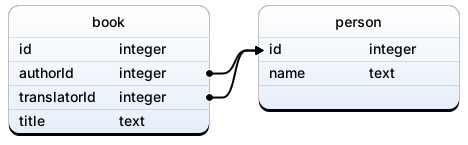
When this happens, associations can't be automatically inferred from the database schema. GRDB will complain with a fatal error such as "Ambiguous foreign key from book to person", or "Could not infer foreign key from book to person".
Your help is needed. You have to instruct GRDB which foreign key to use:
struct Book: TableRecord {
    // Define foreign keys
    static let authorForeignKey = ForeignKey(["authorId"])
    static let translatorForeignKey = ForeignKey(["translatorId"])

    // Use foreign keys to define associations:
    static let author = belongsTo(Person.self, using: authorForeignKey)
    static let translator = belongsTo(Person.self, using: translatorForeignKey)
}
Foreign keys are always defined from the table that contains the columns at the origin of the foreign key. Person's symmetric HasMany associations reuse Book's foreign keys:
struct Person: TableRecord {
    static let writtenBooks = hasMany(Book.self, using: Book.authorForeignKey)
    static let translatedBooks = hasMany(Book.self, using: Book.translatorForeignKey)
}
Foreign keys can also be defined from query interface columns:
struct Book: TableRecord {
    enum Columns: String, ColumnExpression {
        case id, title, authorId, translatorId
    }

    static let authorForeignKey = ForeignKey([Columns.authorId])
    static let translatorForeignKey = ForeignKey([Columns.translatorId])
}
When the destination table of a foreign key does not define any primary key, you need to provide the full definition of a foreign key:
struct Book: TableRecord {
    static let authorForeignKey = ForeignKey(["authorId"], to: ["id"])
    static let author = belongsTo(Person.self, using: authorForeignKey)
}
Building Requests from Associations
Once you have defined associations, you can define fetch request that involve several record types.
☝️ Note: Those requests are executed by SQLite as SQL joined queries. In all examples below, we'll show the SQL queries executed by our association-based requests. You can ignore them if you are not familiar with SQL.
Fetch requests do not visit the database until you fetch values from them. This will be covered in Fetching Values from Associations. But before you can fetch anything, you have to describe what you want to fetch. This is the topic of this chapter.
- Requesting Associated Records
- Joining Methods
- Combining Associations
- Filtering Associations
- Sorting Associations
- Columns Selected by an Association
- Table Aliases
- Refining Association Requests
Requesting Associated Records
You can use associations to build requests for associated records.
For example, given a Book.author BelongsTo association, you can build a request for the author of a book. In the example below, we return this request from the Book.author property:
struct Book: TableRecord, EncodableRecord {
    static let author = belongsTo(Author.self)

    /// The request for a book's author
    var author: QueryInterfaceRequest<Author> {
        return request(for: Book.author)
    }
}
This request can fetch a book's author:
let book: Book = ...
let author = try book.author.fetchOne(db)   // Author?
HasOne, HasMany, HasOneThrough, and HasManyThrough associations can also build requests for associated records. For example:
struct Author: TableRecord, EncodableRecord {
    static let books = hasMany(Book.self)

    /// The request for an author's books
    var books: QueryInterfaceRequest<Book> {
        return request(for: Author.books)
    }
}

let author: Author = ...
let books = try author.books.fetchAll(db)   // [Book]
Requests for associated records can be filtered and ordered like all query interface requests:
let novels = try author
    .books
    .filter(Column("kind") == BookKind.novel)
    .order(Column("publishDate").desc)
    .fetchAll(db)
Those requests can also turn out useful when you want to track their changes with database observation tools like RxGRDB:
// Track changes in the author's books:
let author: Author = ...
author.books.rx
    .fetchAll(in: dbQueue)
    .subscribe(onNext: { (books: [Book]) in
        print("Author's book have changed")
    })
Joining Methods
You build requests that involve several records with the four "joining methods":
including(optional: association)including(required: association)joining(optional: association)joining(required: association)
Before we describe them in detail, let's see a few requests they can build:
/// All books with their respective authors
let request = Book
    .including(required: Book.author)

/// All books with their respective authors, sorted by title
let request = Book
    .order(Column("title"))
    .including(required: Book.author)

/// All books written by a French author
let request = Book
    .joining(required: Book.author.filter(Column("countryCode") == "FR"))
The pattern is always the same: you start from a base request, that you extend with one of the joining methods.
To choose the joining method you need, you ask yourself two questions:
-
Should the associated records be fetched along with the base records?
If yes, use
including(...). Otherwise, usejoining(...).For example, to load all books with their respective authors, you want authors to be fetched, and you use
including:/// All books with their respective authors let request = Book .including(required: Book.author)On the other side, to load all books written by a French author, you sure need to filter authors, but you don't need them to be present in the fetched results. You prefer
joining:/// All books written by a French author let request = Book .joining(required: Book.author.filter(Column("countryCode") == "FR")) -
Should the request allow missing associated records?
If yes, choose the
optionalvariant. Otherwise, chooserequired.For example, to load all books with their respective authors, even if the book has no recorded author, you'd use
including(optional:):/// All books with their respective (eventual) authors /// (One Thousand and One Nights should be there) let request = Book .including(optional: Book.author)You can remember to use
optionalwhen the fetched associated records should feed optional Swift values, of typeAuthor?. Conversely, when the fetched results feed non-optional values of typeAuthor, preferrequired.Another way to describe the difference is that
requiredfilters the fetched results in order to discard missing associated records, whenoptionaldoes not filter anything, and lets missing values pass through.For example, consider this request:
let request = Book
    .joining(optional: Book.author.filter(Column("countryCode") == "FR"))
It fetches books that have a French author, but also those who don't 😅. It's just another way to tell
Book.all(). But we'll see below that such join can turn out useful.Finally, readers who speak SQL may compare
optionalwith left joins, andrequiredwith inner joins.
Combining Associations
Associations can be combined in order to build more complex requests.
You can join several associations in parallel:
// SELECT book.*, person1.*, person2.*
// FROM book
// JOIN person person1 ON person1.id = book.authorId
// LEFT JOIN person person2 ON person2.id = book.translatorId
let request = Book
    .including(required: Book.author)
    .including(optional: Book.translator)
The request above fetches all books, along with their author and eventual translator.
You can chain associations in order to jump from a record to another:
// SELECT book.*, person.*, country.*
// FROM book
// JOIN person ON person.id = book.authorId
// LEFT JOIN country ON country.code = person.countryCode
let request = Book
    .including(required: Book.author
        .including(optional: Person.country))
The request above fetches all books, along with their author, and their author's country.
When you chain associations, you can avoid fetching intermediate tables by replacing the including method with joining. The request below fetches all books, along with their author's country, but does not include the intermediate authors in the fetched results:
// SELECT book.*, country.*
// FROM book
// LEFT JOIN person ON person.id = book.authorId
// LEFT JOIN country ON country.code = person.countryCode
let request = Book
    .joining(optional: Book.author
        .including(optional: Person.country))
HasOneThrough and HasManyThrough associations provide a shortcut for those requests that skip intermediate tables:
// SELECT book.*, country.*
// FROM book
// LEFT JOIN person ON person.id = book.authorId
// LEFT JOIN country ON country.code = person.countryCode
let request = Book.including(optional: Book.country)
⚠️ Warning: you can not currently chain a required association behind an optional association:
// Not implemented
let request = Book
    .joining(optional: Book.author
        .including(required: Person.country))
This code compiles, but you'll get a runtime fatal error "Not implemented: chaining a required association behind an optional association". Future versions of GRDB may allow such requests.
Filtering Associations
You can filter associated records.
The filter(_:), filter(key:) and filter(keys:) methods, that you already know for filtering simple requests, can filter associated records as well:
// SELECT book.*
// FROM book
// JOIN person ON person.id = book.authorId
//            AND person.countryCode = 'FR'
let frenchAuthor = Book.author.filter(Column("countryCode") == "FR")
let request = Book.joining(required: frenchAuthor)
The request above fetches all books written by a French author.
There are more filtering options:
- Filtering on conditions that involve several tables.
- Filtering in the WHERE clause instead of the ON clause (can be useful when you are skilled enough in SQL to make the difference).
Those extra filtering options require Table Aliases, introduced below.
Sorting Associations
You can sort fetched results according to associated records.
The order() method, that you already know for sorting simple requests, can sort associated records as well:
// SELECT book.*, person.*
// FROM book
// JOIN person ON person.id = book.authorId
// ORDER BY person.name
let sortedAuthor = Book.author.order(Column("name"))
let request = Book.including(required: sortedAuthor)
When you sort both the base record on the associated record, the request is sorted on the base record first, and on the associated record next:
// SELECT book.*, person.*
// FROM book
// JOIN person ON person.id = book.authorId
// ORDER BY book.publishDate DESC, person.name
let sortedAuthor = Book.author.order(Column("name"))
let request = Book
    .including(required: sortedAuthor)
    .order(Column("publishDate").desc)
There are more sorting options:
- Sorting on expressions that involve several tables.
- Changing the order of the sorting terms (such as sorting on author name first, and then publish date).
Those extra sorting options require Table Aliases, introduced below.
Columns Selected by an Association
By default, associated records include all their columns:
// SELECT book.*, author.*
// FROM book
// JOIN author ON author.id = book.authorId
let request = Book.including(required: Book.author)
The selection can be changed for each individual request, or for all requests including a given type.
To specify the selection of an associated record in a specific request, use the select method:
// SELECT book.*, author.id, author.name
// FROM book
// JOIN author ON author.id = book.authorId
let restrictedAuthor = Book.author.select(Column("id"), Column("name"))
let request = Book.including(required: restrictedAuthor)
To specify the default selection for all inclusions of a given type, define the databaseSelection property:
struct RestrictedAuthor: TableRecord {
    static let databaseSelection: [SQLSelectable] = [Column("id"), Column("name")]
}

struct ExtendedAuthor: TableRecord {
    static let databaseSelection: [SQLSelectable] = [AllColumns(), Column.rowID]
}

extension Book {
    static let restrictedAuthor = belongsTo(RestrictedAuthor.self)
    static let extendedAuthor = belongsTo(ExtendedAuthor.self)
}

// SELECT book.*, author.id, author.name
// FROM book
// JOIN author ON author.id = book.authorId
let request = Book.including(required: Book.restrictedAuthor)

// SELECT book.*, author.*, author.rowid
// FROM book
// JOIN author ON author.id = book.authorId
let request = Book.including(required: Book.extendedAuthor)
Modifying databaseSelection not only affects joined requests, but all requests built from the modified record. This is how records make sure they are always fed with the columns they need, no more, no less:
// SELECT id, name FROM author
let request = RestrictedAuthor.all()
☝️ Note: make sure the
databaseSelectionproperty is explicitely declared as[SQLSelectable]. If it is not, the Swift compiler may infer a type which may silently miss the protocol requirement, resulting in sticky SELECT * requests. See Columns Selected by a Request for further information.
Table Aliases
In all examples we have seen so far, all associated records are joined, included, filtered, and sorted independently. We could not filter them on conditions that involve several records, for example.
Let's say we look for posthumous books, published after their author has died. We need to compare a book publication date with an author eventual death date.
Let's first see a wrong way to do it:
// A wrong request:
// SELECT book.*
// FROM book
// JOIN person ON person.id = book.authorId
// WHERE book.publishDate >= book.deathDate
let request = Book
    .joining(required: Book.author)
    .filter(Column("publishDate") >= Column("deathDate"))
When executed, we'll get a DatabaseError of code 1, "no such column: book.deathDate".
That is because the "deathDate" column has been used for filtering books, when it is defined on the person database table.
To fix this error, we need a table alias:
let authorAlias = TableAlias()
We modify the Book.author association so that it uses this table alias, and we use the table alias to qualify author columns where needed:
// SELECT book.*
// FROM book
// JOIN person ON person.id = book.authorId
// WHERE book.publishDate >= person.deathDate
let request = Book
    .joining(required: Book.author.aliased(authorAlias))
    .filter(Column("publishDate") >= authorAlias[Column("deathDate")])
Table aliases can also improve control over the ordering of request results. In the example below, we override the default ordering of associated records by sorting on author names first:
// SELECT book.*
// FROM book
// JOIN person ON person.id = book.authorId
// ORDER BY person.name, book.publishDate
let request = Book
    .joining(required: Book.author.aliased(authorAlias))
    .order(authorAlias[Column("name")], Column("publishDate"))
Table aliases can be given a name. This name is guaranteed to be used as the table alias in the SQL query. This guarantee lets you write SQL snippets when you need it:
// SELECT b.*
// FROM book b
// JOIN person a ON a.id = b.authorId
//              AND a.countryCode = 'FR'
// WHERE b.publishDate >= a.deathDate
let bookAlias = TableAlias(name: "b")
let authorAlias = TableAlias(name: "a")
let request = Book.aliased(bookAlias)
    .joining(required: Book.author.aliased(authorAlias)
        .filter(sql: "a.countryCode = ?", arguments: ["FR"]))
    .filter(sql: "b.publishDate >= a.deathDate")
☝️ Note: avoid reusing table aliases between several tables or requests, because you will get a fatal error:
// Fatal error: A TableAlias most not be used to refer to multiple tables
let alias = TableAlias()
let books = Book.aliased(alias)...
let people = Person.aliased(alias)...
Refining Association Requests
You can join and include an association several times in a single request. This can help you craft complex requests in a modular way.
Let's say, for example, that your application needs all books, along with their Spanish authors, sorted by author name and then by title. That's already pretty complex.
This request can be built in a single shot:
let authorAlias = TableAlias()
let request = Book
    .including(required: Book.author
        .filter(Column("countryCode") == "ES")
        .aliased(authorAlias))
    .order(authorAlias[Column("name")], Column("title"))
The same request can also be built in three distinct steps, as below:
// 1. include author
var request = Book.including(required: Book.author)

// 2. filter by author country
request = request.joining(required: Book.author.filter(Column("countryCode") == "ES"))

// 3. sort by author name and then title
let authorAlias = TableAlias()
request = request
    .joining(optional: Book.author.aliased(authorAlias))
    .order(authorAlias[Column("name")], Column("title"))
See how the Book.author has been joined or included, on each step, independently, for a different purpose. We can wrap those steps in an extension to the QueryInterfaceRequest<Book> type:
extension QueryInterfaceRequest where T == Book {
    func filter(authorCountryCode: String) -> QueryInterfaceRequest<Book> {
        let filteredAuthor = Book.author.filter(Column("countryCode") == countryCode)
        return joining(required: filteredAuthor)
    }

    func orderedByAuthorNameAndTitle() -> QueryInterfaceRequest<Book> {
        let authorAlias = TableAlias()
        return joining(optional: Book.author.aliased(authorAlias))
            .order(authorAlias[Column("name")], Column("title"))
    }
}
And now our complex request looks much simpler:
let request = Book
    .including(required: Book.author)
    .filter(authorCountryCode: "ES")
    .orderedByAuthorNameAndTitle()
When you join or include an association several times, with the same association key, GRDB will apply the following rules:
-
includingwins overjoining:// Equivalent to Record.including(optional: association) Record .including(optional: association) .joining(optional: association) -
requiredwins overoptional:// Equivalent to Record.including(required: association) Record .including(required: association) .including(optional: association) -
All filters are applied:
// Equivalent to Record.including(required: association.filter(condition1 && condition2)) Record .including(required: association.filter(condition1)) .including(optional: association.filter(condition1)) -
The last ordering wins:
// Equivalent to Record.including(required: association.order(ordering2)) Record .including(required: association.order(ordering1)) .including(optional: association.order(ordering2)) -
The last selection wins:
// Equivalent to Record.including(required: association.select(selection2))
Record
    .including(required: association.select(selection1))
    .including(optional: association.select(selection2))
Fetching Values from Associations
We have seen in Building Requests from Associations how to define requests that involve several records by the mean of Joining Methods.
If your application needs to display a list of books with information about their author, country, and cover image, you may build the following joined request:
// SELECT book.*, author.*, country.*, coverImage.*
// FROM book
// JOIN author ON author.id = book.authorId
// LEFT JOIN country ON country.code = author.countryCode
// LEFT JOIN coverImage ON coverImage.bookId = book.id
let request = Book
    .including(required: Book.author
        .including(optional: Author.country))
    .including(optional: Bool.coverImage)
Now is the time to tell how joined requests should be consumed.
You will generally define a record type that matches the structure of the request. You'll make it adopt the FetchableRecord protocol, so that it can decode database rows. Often, you'll also make it adopt the standard Decodable protocol, because the compiler will generate the decoding code for you.
For example, the request above can be consumed into the following record:
struct BookInfo: FetchableRecord, Decodable {
    var book: Book
    var author: Author
    var country: Country?
    var coverImage: CoverImage?
}

let bookInfos = try BookInfo.fetchAll(db, request) // [BookInfo]
- The Structure of a Joined Request
- Decoding a Joined Request with a Decodable Record
- Decoding a Joined Request with FetchableRecord
- Good Practices for Designing Record Types - in this general guide about records, check out the "Compose Records" chapter.
The Structure of a Joined Request
Joined request defines a tree of associated records identified by "association keys".
Below, author and cover image are both associated to book, and country is associated to author:
let request = Book
    .including(required: Book.author
        .including(optional: Author.country))
    .including(optional: Bool.coverImage)
This request builds the following tree of association keys:
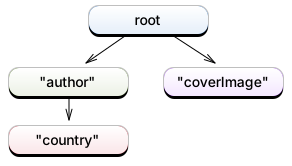
Association keys are strings. They are the names of the database tables of associated records (unless you specify otherwise, as we'll see below).
Those keys are associated with slices in the fetched rows:
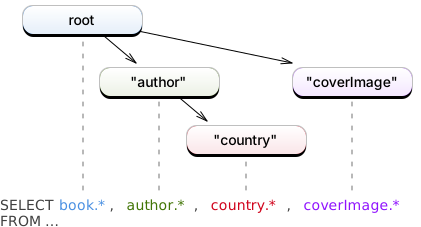
We'll see below how this tree of association keys and row slices can feed a Decodable record type. We'll then add some details by using FetchableRecord without Decodable support.
Decoding a Joined Request with a Decodable Record
When association keys match the property names of a Decodable record, you get free decoding of joined requests into this record:
struct BookInfo: FetchableRecord, Decodable {
    var book: Book
    var author: Author
    var country: Country?
    var coverImage: CoverImage?
}

let bookInfos = try BookInfo.fetchAll(db, request) // [BookInfo]
We see that a hierarchical tree has been flattened in the BookInfo record.
This flattening is made possible because the BookInfo initializer generated by the Decodable protocol matches coding keys with association keys by performing a breadth-first search in the tree of association keys.
This deserves a little explanation:
You known that the Decodable protocol feeds a value's properties by looking for coding keys. For example, the standard built-in JSONDecoder matches those coding keys with dictionary keys in a JSON object. The GRDB record decoder also matches coding keys, but with association keys:
Practically speaking, the BookInfo initializer first looks for the "book" coding key. This key is not found anywhere in the tree of association keys, so the book property is initialized from the row slice associated with the root of the tree, which contains book columns.
The BookInfo initializer then looks for the "author", "country", and "coverImage" coding keys. All those are found in the tree of association keys, and each property is initialized from its matching row slice.
The key lookup digs into the tree of association keys, and stops as soon as a key as been found, digging into deep tree levels only if the key was not found in higher levels (that's called a "breadth-first search"). This is how we can decode a hierarchical tree into a flat record.
But sometimes your decoded records will have better reflect the hierarchical structure of the request:
Decoding a Hierarchical Decodable Record
Some requests are better decoded with a Decodable record that reflects the hierarchical structure of the request.
let request = Book
    .including(optional: Bool.coverImage)
    .including(required: Book.author
        .including(optional: Person.country))
    .including(optional: Book.translator
        .including(optional: Person.country))
This requests for all books, with their cover images, and their authors and translators. Those people are themselves decorated with their respective nationalities.
We plan to decode this request into is the following record:
struct BookInfo: FetchableRecord, Decodable {
    struct AuthorInfo: Decodable {
        var author: Author
        var country: Country?
    }
    var book: Book
    var authorInfo: AuthorInfo
    var translatorInfo: AuthorInfo?
    var coverImage: CoverImage?
}
This request needs a little preparation: we need association keys that match the coding keys for the authorInfo and translatorInfo properties.
And who is the most able to know those coding keys? BookInfo itself, thanks to its CodingKeys enum that was automatically generated by the Swift compiler. We thus define the BookInfo.all() method that builds our request:
extension BookInfo {
    static func all() -> QueryInterfaceRequest<BookInfo> {
        return Book
            .including(optional: Bool.coverImage)
            .including(required: Book.author
                .forKey(CodingKeys.authorInfo)        // (1)
                .including(optional: Person.country))
            .including(optional: Book.translator
                .forKey(CodingKeys.translatorInfo)    // (1)
                .including(optional: Person.country))
            .asRequest(of: BookInfo.self)             // (2)
    }
}

let bookInfos = try BookInfo.all().fetchAll(db, request) // [BookInfo]
- The
forKey(_:)method changes the association key, so that the associated records can feed their target properties. - The
asRequest(of:)method turns the request into a request of BookInfo. See Custom Requests for more information.
Debugging Joined Request Decoding
When you have difficulties building a Decodable record that successfully decodes a joined request, we advise to temporarily decode raw database rows, and inspect them.
let request = Book
    .including(required: Book.author
        .including(optional: Author.country))
    .including(optional: Bool.coverImage)

let rows = try Row.fetchAll(db, request)
print(rows[0])
// Prints:
// ▿ [id:1, authorId:2, title:"Moby-Dick"]
//   unadapted: [id:1, authorId:2, title:"Moby-Dick", id:2, name:"Herman Melville", countryCode:"US", code:"US", name:"United States of America", id:NULL, imageId:NULL, path:NULL]
//   - person: [id:2, name:"Herman Melville", countryCode:"US"]
//     - country: [code:"US", name:"United States of America"]
//   - coverImage: [id:NULL, imageId:NULL, path:NULL]
There are two important things to look into the row debugging description:
- the association keys: "person", "country", and "coverImage" in our example
- associated rows that contain only null values (coverImage).
The associated rows that contain only null values are easy to deal with: null rows loaded from optional associated records should be decoded into Swift optionals:
struct BookInfo: FetchableRecord, Decodable {
    var book: Book
    var author: Author          // .including(required: Book.author)
    var country: Country?       // .including(optional: Author.country)
    var coverImage: CoverImage? // .including(optional: Bool.coverImage)
}
Association keys may not match the property names of your Decodable record. In this case, use the forKey(_:) method.
This can be done at the request level:
struct BookInfo: FetchableRecord, Decodable {
    var book: Book
    var author: Author          // Expect "author" association key
    var country: Country?
    var coverImage: CoverImage?
}

let request = Book
    .including(required: Book.author
        .forKey("author")       // Change association key
        .including(optional: Author.country))
    .including(optional: Bool.coverImage)
Association keys can also be defined right into the definition of the association:
struct Book {
    static let author = belongsTo(Person.self, key: "author")
}

let request = Book
    .including(required: Book.author // "author" association key
        .including(optional: Author.country))
    .including(optional: Bool.coverImage)
The best choice is up to you and the structure of your application. See also Decoding a Hierarchical Decodable Record for further discussion about decoding keys.
Decoding a Joined Request with FetchableRecord
When Dedocable records provides convenient decoding of joined rows, you may want a little more control over row decoding.
The init(row:) initializer of the FetchableRecord protocol is what you look after:
struct BookInfo: FetchableRecord {
    var book: Book
    var author: Author
    var country: Country?
    var coverImage: CoverImage?

    init(row: Row) {
        book = Book(row: row)
        author = row["author"]
        country = row["country"]
        coverImage = row["coverImage"]
    }
}

let bookInfos = try BookInfo.fetchAll(db, request) // [BookInfo]
You are already familiar with row subscripts to decode database values:
let name: String = row["name"]
When you extract a record instead of a value from a row, GRDB perfoms a breadth-first search in the tree of association keys defined by the joined request. If the key is not found, or only associated with columns that all contain NULL values, an optional record is decoded as nil:
let author: Author = row["author"]
let country: Country? = row["country"]
You can also perform custom navigation in the tree by using row scopes. See Row Adapters for more information.
Association Aggregates
It is possible to fetch aggregated values from a HasMany association:
Counting associated records, fetching the minimum, maximum, average value of an associated record column, computing the sum of an associated record column, these are all aggregation operations.
When you need to compute aggregates from a single record, you use regular aggregating methods, detailed in the Fetching Aggregated Values chapter. For example:
let author: Author = ...
let bookCount = try author.books.fetchCount(db)  // Int

let request = author.books.select(max(yearColumn))
let maxBookYear = try Int.fetchOne(db, request)  // Int?
When you need to compute aggregates from several record, in a single shot, you'll use an association aggregate. Those are the topic of this chapter.
For example, you'll use the isEmpty aggregate when you want, say, to fetch all authors who wrote no book at all:
let lazyAuthors: [Author] = try Author.having(Author.books.isEmpty).fetchAll(db)
let productiveAuthors: [Author] = try Author.having(Author.books.isEmpty == false).fetchAll(db)
And you'll use the count aggregate in order to fetch all authors along with the number of books they wrote:
struct AuthorInfo: Decodable, FetchableRecord {
    var author: Author
    var bookCount: Int
}

let request = Author.annotated(with: Author.books.count)
let authorInfos: [AuthorInfo] = try AuthorInfo.fetchAll(db, request)

for info in authorInfos {
    print("\(info.author.name) wrote \(info.bookCount) book(s).")
}
Available Association Aggregates
HasMany associations let you build the following association aggregates:
books.countbooks.isEmptybooks.min(column)books.max(column)books.average(column)books.sum(column)
Annotating a Request with Aggregates
The annotated(with:) method appends aggregated values to the selected columns of a request. You can append as many aggregates values as needed, from one or several associations.
In order to access those values, you fetch records that have matching properties.
For example:
struct AuthorInfo: Decodable, FetchableRecord {
    var author: Author
    var bookCount: Int
    var maxBookYear: Int?
}

// SELECT author.*,
//        COUNT(DISTINCT book.rowid) AS bookCount,
//        MAX(book.year) AS maxBookYear,
// FROM author
// LEFT JOIN book ON book.authorId = author.id
// GROUP BY author.id
let request = Author.annotated(with:
    Author.books.count,
    Author.books.max(Column("year")))

let authorInfos: [AuthorInfo] = try AuthorInfo.fetchAll(db, request)

for info in authorInfos {
    print(info.author.name)
    print("- number of books: \(info.bookCount)")
    print("- last book published on: \(info.maxBookYear)")
}
As seen in the above example, some aggregated values are given a default name, such as "bookCount" or "maxBookYear". The default name is built from the aggregating method, the association key, and the aggregated column name:
| Method | Key | Column | Default name |
|---|---|---|---|
Author.books.isEmpty |
book |
- | - |
Author.books.count |
book |
- | bookCount |
Author.books.min(Column("year")) |
book |
year |
minBookYear |
Author.books.max(Column("year")) |
book |
year |
maxBookYear |
Author.books.average(Column("price")) |
book |
price |
averageBookPrice |
Author.books.sum(Column("awards")) |
book |
awards |
bookAwardsSum |
You give a custom name to an aggregated value with the aliased method:
struct AuthorInfo: Decodable, FetchableRecord {
    var author: Author
    var numberOfBooks: Int
}

// SELECT author.*, COUNT(DISTINCT book.rowid) AS numberOfBooks
// FROM author
// LEFT JOIN book ON book.authorId = author.id
// GROUP BY author.id
let request = Author.annotated(with: Author.books.count.aliased("numberOfBooks"))
let authorInfos: [AuthorInfo] = try AuthorInfo.fetchAll(db, request)
The aliased method also accept coding keys:
struct AuthorInfo: Decodable, FetchableRecord {
    var author: Author
    var numberOfBooks: Int

    static func fetchAll(_ db: Database) throws -> [AuthorInfo] {
        let request = Author.annotated(with: Author.books.count.aliased(CodingKey.numberOfBooks))
        return try AuthorInfo.fetchAll(db, request)
    }
}
Custom names help consuming complex aggregates that have no name by default:
struct AuthorInfo: Decodable, FetchableRecord {
    var author: Author
    var workCount: Int
}

// SELECT author.*,
//        (COUNT(DISTINCT book.rowid) + COUNT(DISTINCT painting.rowid)) AS workCount
// FROM author
// LEFT JOIN book ON book.authorId = author.id
// LEFT JOIN painting ON painting.authorId = author.id
// GROUP BY author.id
let aggregate = Author.books.count + Author.paintings.count
let request = Author.annotated(with: aggregate.aliased("workCount"))
let authorInfos: [AuthorInfo] = try AuthorInfo.fetchAll(db, request)
Filtering a Request with Aggregates
The having(_:) method filters a request according to an aggregated value. You can append as many aggregate conditions as needed, from one or several associations.
-
Authors who did not write any book:
SQL
SELECT author.*
FROM author
LEFT JOIN book ON book.authorId = author.id
GROUP BY author.id
HAVING COUNT(DISTINCT book.rowid) = 0
let request = Author.having(Author.books.isEmpty) -
Authors who wrote at least one book:
SQL
SELECT author.*
FROM author
LEFT JOIN book ON book.authorId = author.id
GROUP BY author.id
HAVING COUNT(DISTINCT book.rowid) > 0
let request = Author.having(Author.books.isEmpty == false) -
Authors who wrote at least two books:
SQL
SELECT author.*
FROM author
LEFT JOIN book ON book.authorId = author.id
GROUP BY author.id
HAVING COUNT(DISTINCT book.rowid) >= 2
let request = Author.having(Author.books.count >= 2) -
Authors who wrote at least one book after 2010:
SQL
SELECT author.*
FROM author
LEFT JOIN book ON book.authorId = author.id
GROUP BY author.id
HAVING MAX(book.year) >= 2010
let request = Author.having(Author.books.max(Column("year")) >= 2010) -
Authors who wrote at least one book of kind "novel":
SQL
SELECT author.*
FROM author
LEFT JOIN book ON book.authorId = author.id AND book.kind = 'novel'
GROUP BY author.id
HAVING COUNT(DISTINCT book.rowid) > 0
let novels = Author.books.filter(Column("kind") == "novel") let request = Author.having(novels.isEmpty == false) -
Authors who wrote more books than they made paintings:
SQL
SELECT author.*
FROM author
LEFT JOIN book ON book.authorId = author.id
LEFT JOIN painting ON painting.authorId = author.id
GROUP BY author.id
HAVING COUNT(DISTINCT book.rowid) > COUNT(DISTINCT painting.rowid)
let request = Author.having(Author.books.count > Author.paintings.count) -
Authors who wrote no book, but made at least one painting:
SQL
SELECT author.*
FROM author
LEFT JOIN book ON book.authorId = author.id
LEFT JOIN painting ON painting.authorId = author.id
GROUP BY author.id
HAVING ((COUNT(DISTINCT book.rowid) = 0) AND (COUNT(DISTINCT painting.rowid) > 0))
let request = Author.having(Author.books.isEmpty && !Author.paintings.isEmpty)
Aggregate Operations
Aggregates can be modified and combined with Swift operators:
-
Logical operators
&&,||and!SQL
SELECT author.*
FROM author
LEFT JOIN book ON book.authorId = author.id
LEFT JOIN painting ON painting.authorId = author.id
GROUP BY author.id
HAVING ((COUNT(DISTINCT book.rowid) = 0) AND (COUNT(DISTINCT painting.rowid) = 0))
let condition = Author.books.isEmpty && Author.paintings.isEmpty let request = Author.having(condition) -
Comparison operators
<,<=,=,!=,>=,>SQL
SELECT author.*
FROM author
LEFT JOIN book ON book.authorId = author.id
GROUP BY author.id
HAVING MAX(book.year) >= 2010
let request = Author.having(Author.books.max(Column("year")) >= 2010) -
Arithmetic operators
+,-,*,/SQL
SELECT author.*,
       (COUNT(DISTINCT book.rowid) +
        COUNT(DISTINCT painting.rowid)) AS workCount
FROM author
LEFT JOIN book ON book.authorId = author.id
LEFT JOIN painting ON painting.authorId = author.id
GROUP BY author.id
let workCount = Author.books.count + Author.paintings.count) let request = Author.annotated(with: workCount.aliased("workCount")) -
IFNULL operator
??SQL
SELECT "team".*, IFNULL(MIN("player"."score"), 0) AS "minPlayerScore"
FROM "team"
LEFT JOIN "player" ON ("player"."teamId" = "team"."id")
GROUP BY "team"."id"
let request = Team.annotated(with: Team.players.min(Column("score")) ?? 0)
Isolation of Multiple Aggregates
When you compute multiple aggregates, make sure they use as many distinct association keys as there are distinct populations of associated records.
In the example below, we use compute two aggregates from the same association Author.books. Both aggregates are computed on the same population of associated records, and so we want them to share the same association key:
-
Authors with the publishing year of their first and last book:
SQL
SELECT author.*,
       MIN(book.year) AS minBookYear,
       MAX(book.year) AS maxBookYea
FROM author
LEFT JOIN book ON book.authorId = author.id
GROUP BY author.id
struct Author: TableRecord { static let books = hasMany(Book.self) // association key "book" } struct AuthorInfo: Decodable, FetchableRecord { var author: Author var minBookYear: Int? var maxBookYear: Int? } let request = Author.annotated(with: Author.books.min(Column("year")), // association key "book" Author.books.max(Column("year"))) // association key "book" let authorInfos: [AuthorInfo] = try AuthorInfo.fetchAll(db, request)
In this other example, the Author.books and Author.paintings have the distinct book and painting keys. They don't interfere, and provide the expected results:
-
Authors with their number of books and paintings:
SQL
SELECT author.*,
       (COUNT(DISTINCT book.rowid) + COUNT(DISTINCT painting.rowid)) AS workCount
FROM author
LEFT JOIN book ON book.authorId = author.id
LEFT JOIN painting ON painting.authorId = author.id
GROUP BY author.id
struct Author: TableRecord { static let books = hasMany(Book.self) // association key "book" static let paintings = hasMany(Painting.self) // association key "painting" } struct AuthorInfo: Decodable, FetchableRecord { var author: Author var workCount: Int } let aggregate = Author.books.count + // association key "book" Author.paintings.count // association key "painting" let request = Author.annotated(with: aggregate.aliased("workCount")) let authorInfos: [AuthorInfo] = try AuthorInfo.fetchAll(db, request)
But in the following example, we use the same association Author.books twice, in order to compute aggregates on two distinct populations of associated books. We must provide explicit keys in order to make sure both aggregates are computed independently:
-
Authors with their number of novels and theatre plays:
SQL
SELECT author.*,
       COUNT(DISTINCT book1.rowid) AS novelCount,
       COUNT(DISTINCT book2.rowid) AS theatrePlayCount
FROM author
LEFT JOIN book book1 ON book1.authorId = author.id AND book1.kind = 'novel'
LEFT JOIN book book2 ON book2.authorId = author.id AND book2.kind = 'theatrePlay'
GROUP BY author.id
struct Author: TableRecord { static let books = hasMany(Book.self) // association key "book" } struct AuthorInfo: Decodable, FetchableRecord { var author: Author var novelCount: Int var theatrePlayCount: Int } let novelCount = Author.books .filter(Column("kind") == "novel") .forKey("novel") // association key "novel" .count let theatrePlayCount = Author.books .filter(Column("kind") == "theatrePlay") .forKey("theatrePlay") // association key "theatrePlay" .count let request = Author.annotated(with: novelCount, theatrePlayCount) let authorInfos: [AuthorInfo] = try AuthorInfo.fetchAll(db, request)When one doesn't use distinct association keys for novels and theatre plays, GRDB will not count two distinct sets of associated books, and will not fetch the expected results:
SQL
SELECT author.*,
       COUNT(DISTINCT book.rowid) AS novelCount,
       COUNT(DISTINCT book.rowid) AS theatrePlayCount
FROM author
LEFT JOIN book ON book.authorId = author.id
      AND (book.kind = 'novel' AND book.kind = 'theatrePlay')
GROUP BY author.id
// WRONG: not counting distinct sets of associated books let novelCount = Author.books // association key "book" .filter(Column("kind") == "novel") .count .aliased("novelCount") let theatrePlayCount = Author.books // association key "book" .filter(Column("kind") == "theatrePlay") .count .aliased("theatrePlayCount") let request = Author.annotated(with: novelCount, theatrePlayCount) let authorInfos: [AuthorInfo] = try AuthorInfo.fetchAll(db, request)
DerivableRequest Protocol
The DerivableRequest protocol is adopted by both query interface requests such as Author.all() and associations such as Book.author. It is intended for you to use as a customization point when you want to extend the built-in GRDB apis.
For example:
extension DerivableRequest where RowDecoder == Author {
    func filter(country: String) -> Self {
        return filter(Column("country") == country)
    }

    func orderByFullName() -> Self {
        return order(
            Column("lastName").collating(.localizedCaseInsensitiveCompare),
            Column("firstName").collating(.localizedCaseInsensitiveCompare))
    }
}
Thanks to DerivableRequest, both the filter(country:) and orderByFullName() methods are now available for both Author-based requests and associations:
// French authors sorted by full name:
let request = Author.all()
    .filter(country: "FR")
    .orderByFullName()

// French books, sorted by full name of author:
let request = Book.joining(required: Book.author
    .filter(country: "FR")
    .orderByFullName())
Known Issues
You can't chain a required association on an optional association:
// NOT IMPLEMENTED
let request = Book
    .joining(optional: Book.author
        .including(required: Person.country))
This code compiles, but you'll get a runtime fatal error "Not implemented: chaining a required association behind an optional association". Future versions of GRDB may allow such requests.
Future Directions
The APIs that have been described above do not cover the whole topic of joined requests. Among the biggest omissions, there is:
-
One can not yet join two tables without a foreign key. One can not build the plain
SELECT * FROM a JOIN b, for example. -
One can not yet express requests such as "all authors with all their books".
Come discuss for more information, or if you wish to help turning those features into reality.
This documentation owns a lot to the Active Record Associations guide, which is an immensely well-written introduction to database relations. Many thanks to the Rails team and contributors.
LICENSE
GRDB
Copyright (C) 2019 Gwendal Roué
Permission is hereby granted, free of charge, to any person obtaining a copy of this software and associated documentation files (the "Software"), to deal in the Software without restriction, including without limitation the rights to use, copy, modify, merge, publish, distribute, sublicense, and/or sell copies of the Software, and to permit persons to whom the Software is furnished to do so, subject to the following conditions:
The above copyright notice and this permission notice shall be included in all copies or substantial portions of the Software.
THE SOFTWARE IS PROVIDED "AS IS", WITHOUT WARRANTY OF ANY KIND, EXPRESS OR IMPLIED, INCLUDING BUT NOT LIMITED TO THE WARRANTIES OF MERCHANTABILITY, FITNESS FOR A PARTICULAR PURPOSE AND NONINFRINGEMENT. IN NO EVENT SHALL THE AUTHORS OR COPYRIGHT HOLDERS BE LIABLE FOR ANY CLAIM, DAMAGES OR OTHER LIABILITY, WHETHER IN AN ACTION OF CONTRACT, TORT OR OTHERWISE, ARISING FROM, OUT OF OR IN CONNECTION WITH THE SOFTWARE OR THE USE OR OTHER DEALINGS IN THE SOFTWARE.
Ruby on Rails documentation
Copyright (c) 2005-2018 David Heinemeier Hansson
Permission is hereby granted, free of charge, to any person obtaining a copy of this software and associated documentation files (the "Software"), to deal in the Software without restriction, including without limitation the rights to use, copy, modify, merge, publish, distribute, sublicense, and/or sell copies of the Software, and to permit persons to whom the Software is furnished to do so, subject to the following conditions:
The above copyright notice and this permission notice shall be included in all copies or substantial portions of the Software.
THE SOFTWARE IS PROVIDED "AS IS", WITHOUT WARRANTY OF ANY KIND, EXPRESS OR IMPLIED, INCLUDING BUT NOT LIMITED TO THE WARRANTIES OF MERCHANTABILITY, FITNESS FOR A PARTICULAR PURPOSE AND NONINFRINGEMENT. IN NO EVENT SHALL THE AUTHORS OR COPYRIGHT HOLDERS BE LIABLE FOR ANY CLAIM, DAMAGES OR OTHER LIABILITY, WHETHER IN AN ACTION OF CONTRACT, TORT OR OTHERWISE, ARISING FROM, OUT OF OR IN CONNECTION WITH THE SOFTWARE OR THE USE OR OTHER DEALINGS IN THE SOFTWARE.