| Assets | ||
| JSQMessages.xcodeproj | ||
| JSQMessages.xcworkspace | ||
| JSQMessagesDemo | ||
| JSQMessagesTests | ||
| JSQMessagesViewController | ||
| Screenshots | ||
| .cocoadocs.yml | ||
| .gitignore | ||
| .travis.yml | ||
| CONTRIBUTING.md | ||
| JSQMessagesViewController.podspec | ||
| LICENSE | ||
| Podfile | ||
| Podfile.lock | ||
| README.md | ||




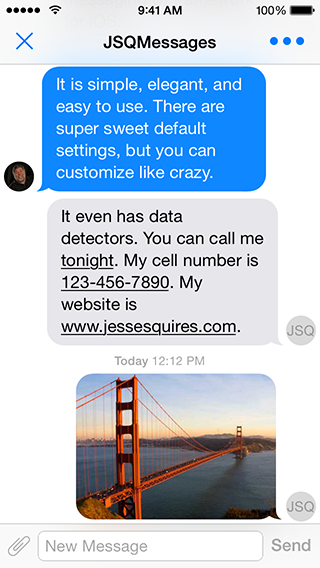
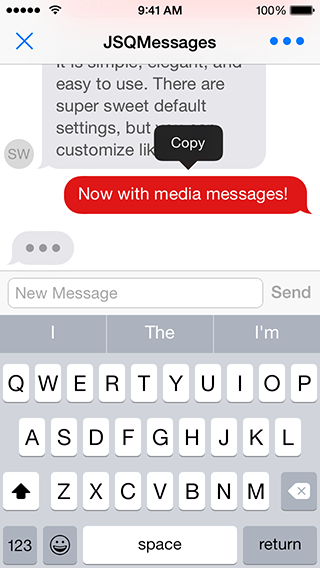
More screenshots available at CocoaControls
Requirements
- iOS 7.0+
- ARC
- JSQSystemSoundPlayer
Need support for iOS 6? You shouldn't. But, there's a branch for that!
git checkout iOS6_support_stable
Note: the iOS6_support_stable branch does not include many of the latest hip and fancy features or fixes
Installation
pod 'JSQMessagesViewController'
Otherwise, drag the JSQMessagesViewController/ folder to your project. Install JSQSystemSoundPlayer and add the QuartzCore.framework.
NOTE:
This repo was formerly named
MessagesTableViewController.And this pod was formerly named
JSMessagesViewController.
For iOS 6.0 support:
pod 'JSMessagesViewController', :git => 'https://github.com/jessesquires/JSQMessagesViewController.git', :branch => 'iOS6_support_stable'
Getting Started
#import <JSQMessagesViewController/JSQMessages.h> // import all headers
-
Demo project
- There's a fucking sweet demo project:
JSQMessages.xcworkspace. - Run
pod installfirst.
- There's a fucking sweet demo project:
-
Model
- Your model objects should conform to the
JSQMessageDataprotocol. - However, you may use the provided
JSQMessageclass.
- Your model objects should conform to the
-
View Controller
- Subclass
JSQMessagesViewController. - Implement the required methods in the
JSQMessagesCollectionViewDataSourceprotocol. - Implement the required methods in the
JSQMessagesCollectionViewDelegateFlowLayoutprotocol.
- Subclass
-
Customizing
- The demo project is well-commented. This should help you configure your view however you like.
Documentation
Read the fucking docs, available here via @CocoaDocs.
Contribute
Please follow these sweet contribution guidelines.
Donate
Support the development of this free, open-source library!
Donations made via Square Cash
Send $1 Just saying thanks!
Send $5 This control is great!
Send $10 This totally saved me time!
Send $25 I want new features!
Send $50 I love this project!
>*You can also send donations via [PayPal](https://www.paypal.com) to jesse.squires.developer@gmail.com*Credits
Created by @jesse_squires, a programming-motherfucker.
- Assets extracted using @0xced / iOS-Artwork-Extractor.
- Originally inspired by @soffes / SSMessagingViewController.
- Many thanks to the contributors of this project.
About
I initially developed this library to use in Hemoglobe for private messages between users.
As it turns out, messaging is something that iOS devs and users really want. Messaging of any kind has turned out to be an increasingly popular mobile app feature in all sorts of contexts and for all sorts of reasons. Thus, I am supporting this project in my free time and have added features way beyond what Hemoglobe ever needed.
Feel free to check out my work at Hexed Bits, or read my blog.
Apps using this library
- Hemoglobe
- ClassDojo
- Schools App
- ChatSecure
- Kytt
- Spark Social
- Spabbit
- Elodie
- Instaply
- Loopse
- Oxwall Messenger
- FourChat
- vCinity
- Quick Text Message
- Libraries for developers
- Buhz|Hyve
- PocketSuite
- Ringring.io
- gDecide
- AwesomeChat
- ParseChat
- Your app here
License
JSQMessagesViewController is released under an MIT License. See LICENSE for details.
Copyright © 2014 Jesse Squires.
Please provide attribution, it is greatly appreciated.