Compare commits
19 Commits
| Author | SHA1 | Date | |
|---|---|---|---|

|
3a19daa08e | ||
|
|
dec467e55b | ||
|
|
a6b435d7e2 | ||
|
|
706860e35f | ||
|
|
25b06ab911 | ||
|
|
7994834151 | ||
|
|
6042284704 | ||
|
|
848b1f5e30 | ||
|
|
d3f8e2a60c | ||
|
|
43920ce700 | ||
|
|
7cb3ee2400 | ||
|
|
8cb6afd918 | ||
|
|
86cf5af6fa | ||
|
|
0742b68e48 | ||
|
|
0aa893767d | ||
|
|
6a22f82a73 | ||
|
|
17cb4f7814 | ||
|
|
c469a3b4c1 | ||
|
|
cfbee77a5b |
12
README.md
Normal file
12
README.md
Normal file
@ -0,0 +1,12 @@
|
||||
# BTCPay Server payment gateway for Odoo 16, 17 and 18
|
||||
|
||||
## Accept bitcoin payments on Odoo 16, 17 and 18
|
||||
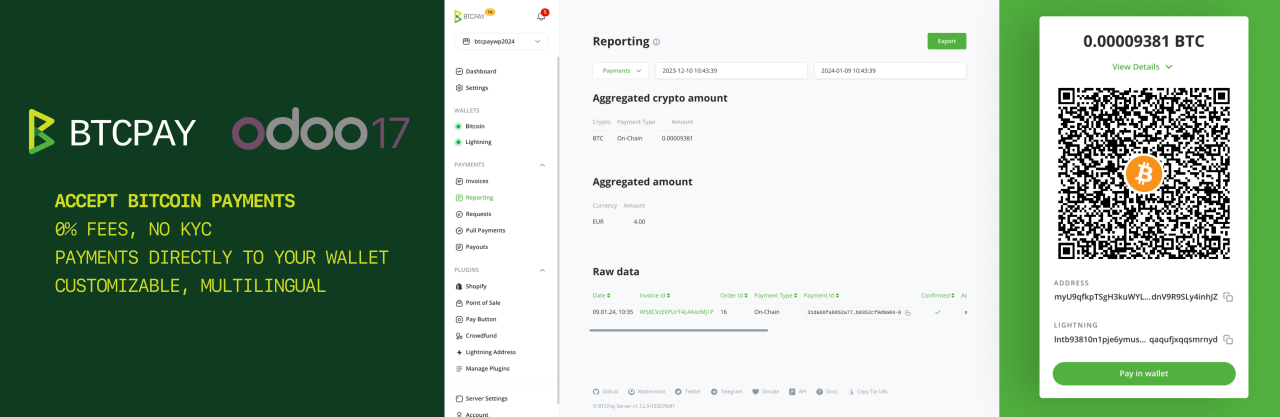
This odoo addon allows you to accept bitcoin and Lightning Network (and other cryptocurrency) payments in your Odoo e-commerce store.
|
||||
|
||||
|
||||
## How to install
|
||||
|
||||
Please find the installation instructions here:
|
||||
- [Odoo 18 documentation](https://github.com/btcpayserver/odoo/blob/18.0/payment_btcpayserver/README.md)
|
||||
- [Odoo 17 documentation](https://github.com/btcpayserver/odoo/blob/17.0/payment_btcpayserver/README.md)
|
||||
- [Odoo 16 documentation](https://github.com/btcpayserver/odoo/blob/16.0/payment_btcpayserver/README.md)
|
||||
@ -1,12 +1,16 @@
|
||||
# BTCPay Server payment gateway for Odoo 16
|
||||
# BTCPay Server payment gateway for Odoo 17
|
||||
|
||||
## This is the module to connect Odoo 16 and BTCPay Server
|
||||
## This is the module to connect Odoo 17 and BTCPay Server
|
||||
This module allows you to accept bitcoin (and other cryptocurrency) payments in your Odoo e-commerce store.
|
||||

|
||||

|
||||
|
||||
:::tip
|
||||
If you use Odoo 16 you can find the documentation [here](https://github.com/btcpayserver/odoo/blob/16.0/payment_btcpayserver/README.md).
|
||||
:::
|
||||
|
||||
## Install the module
|
||||
* Clone our [repository](https://github.com/btcpayserver/odoo) or download the .zip from the [releases page](https://github.com/btcpayserver/odoo/releases)
|
||||
* Make sure you are on branch `16.0` or downloaded a release tagged with version v16.x
|
||||
* Make sure you are on branch `17.0` or downloaded a release tagged with version v17.x
|
||||
* Place the `payment_btcpayserver` directory in your Odoo addons directory
|
||||
* Install dependencies by running `pip install -r requirements.txt` (from inside the `payment_btcpayserver` directory)
|
||||
* Restart Odoo
|
||||
@ -33,16 +37,22 @@ In the BTCPay settings form, tab "Credentials":
|
||||
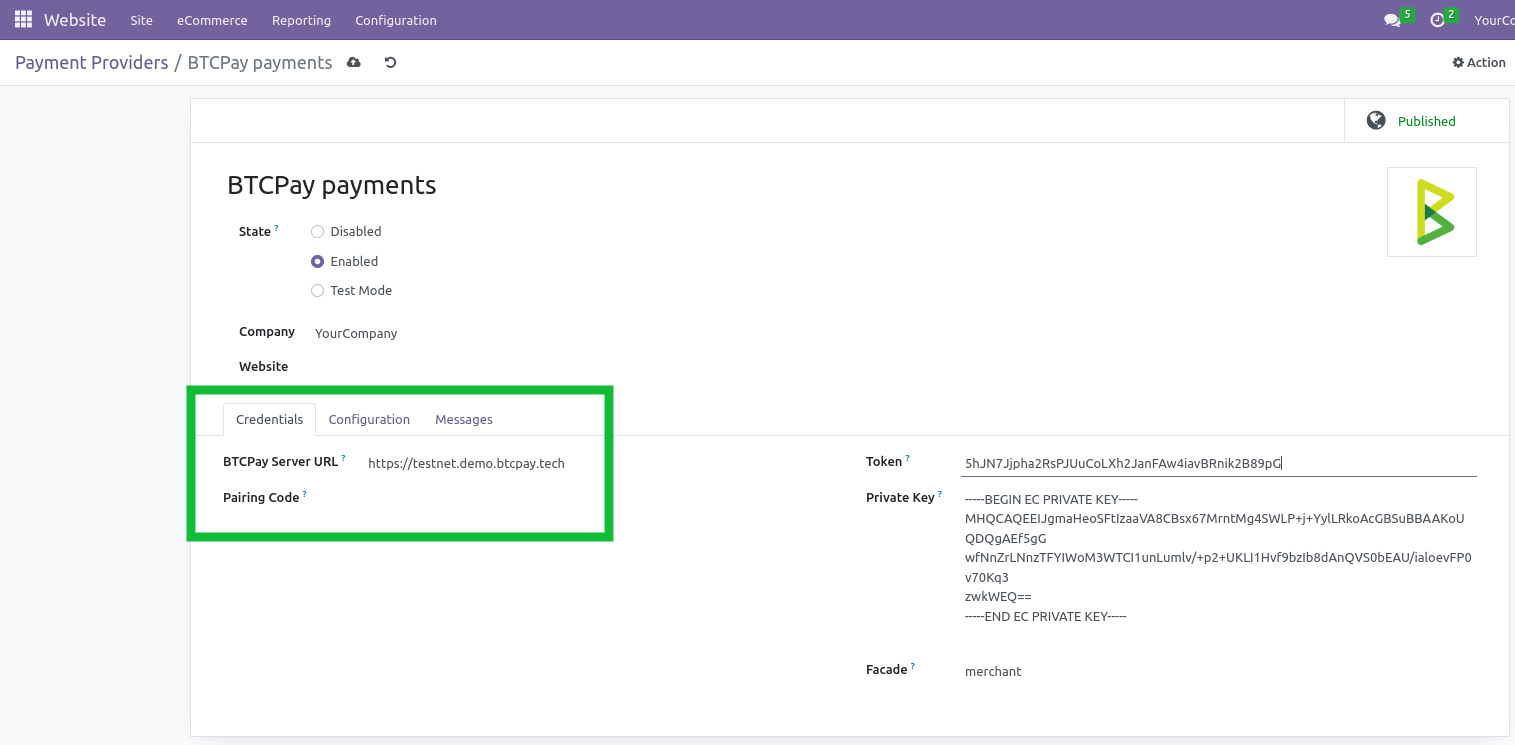
* Field Facade, keep default 'merchant'.
|
||||
|
||||
On the tab "Configuration":
|
||||
* Set field "Payment Journal" to "Bank", you can click the dropdown and click on the suggestion "Bank"
|
||||
* Make sure field "Payment Journal" is set to "Bank", otherwise you can click the dropdown and click on the suggestion "Bank"
|
||||
* Now you can **save** the settings
|
||||
|
||||

|
||||
Check the payment method is enabled:
|
||||
* Go to **Website** -> **Configuration** -> **Payment Methods**
|
||||
* Make sure "Pay with Bitcoin / Lightning Network" is active
|
||||
|
||||
Congrats, all done. Do some testing to be sure all works.
|
||||
|
||||
|
||||
|
||||
## How does the payment page look?
|
||||
|
||||
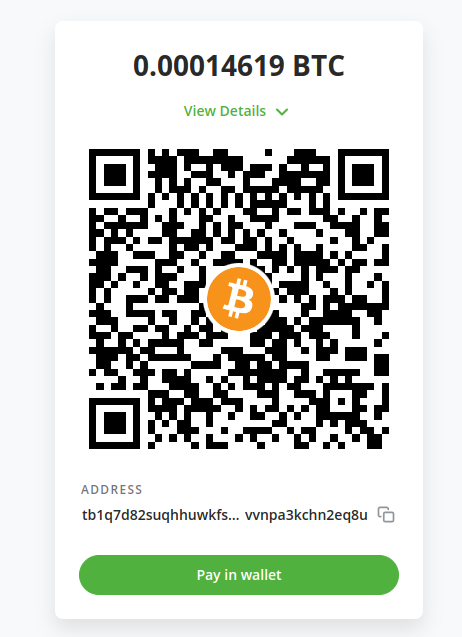
During the checkout the customers will have the option to select the payment method "Pay with Bitcoin / Lightning Network". After selecting they will be redirected to the BTCPay checkout page as shown below.
|
||||
|
||||

|
||||
|
||||
|
||||
|
||||
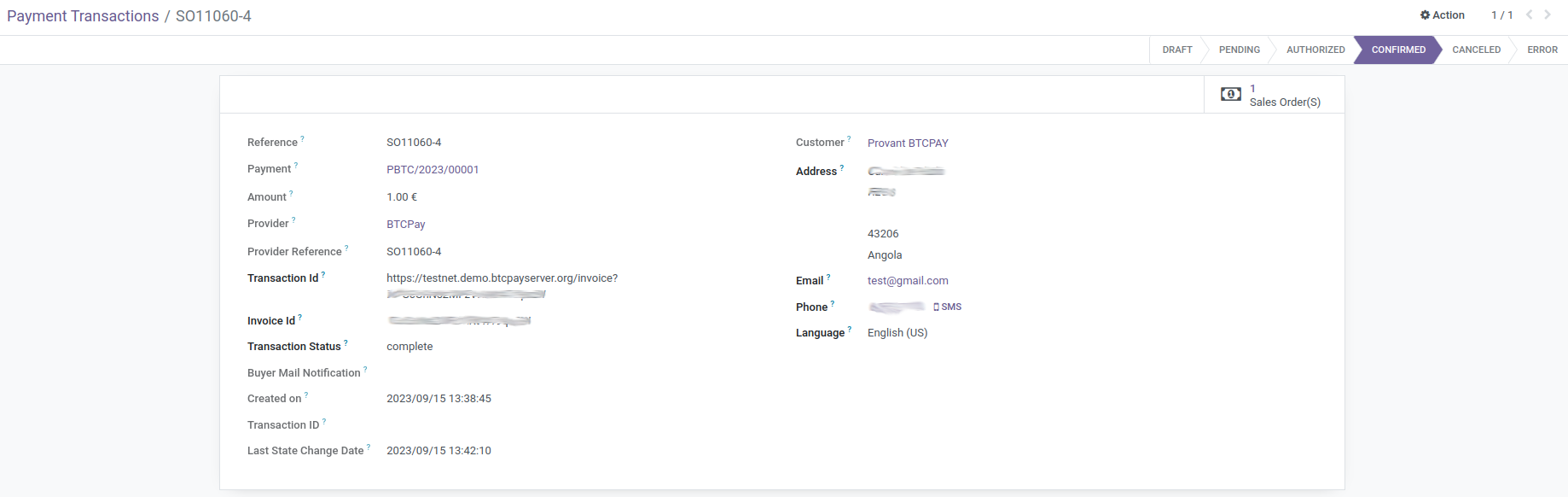
## Transaction BTCPay Details
|
||||
@ -51,7 +61,7 @@ In transaction object, you will find more technical information about this metho
|
||||
* Invoice Id: the id of the invoice for which you want to fetch an event token
|
||||
* Transaction Status: That indicates state of transaction
|
||||
|
||||

|
||||
|
||||
|
||||
## Troubleshooting
|
||||
### The order and transaction status does not get updated to "paid"
|
||||
|
||||
@ -6,9 +6,9 @@ from . import models
|
||||
from odoo.addons.payment import setup_provider, reset_payment_provider
|
||||
|
||||
|
||||
def post_init_hook(cr, registry):
|
||||
setup_provider(cr, registry, 'btcpayserver')
|
||||
def post_init_hook(env):
|
||||
setup_provider(env, 'btcpayserver')
|
||||
|
||||
|
||||
def uninstall_hook(cr, registry):
|
||||
reset_payment_provider(cr, registry, 'btcpayserver')
|
||||
def uninstall_hook(env):
|
||||
reset_payment_provider(env, 'btcpayserver')
|
||||
@ -1,7 +1,7 @@
|
||||
#******************************************************************************
|
||||
# PAYMENT BTCPAY SERVER FOR ODOO
|
||||
#
|
||||
# Copyright (C) 2023 Susanna Fort <susannafm@gmail.com>, ndeet
|
||||
# Copyright (C) 2024 Susanna Fort <susannafm@gmail.com>, ndeet
|
||||
#
|
||||
#******************************************************************************
|
||||
#
|
||||
@ -21,11 +21,11 @@
|
||||
|
||||
{
|
||||
'name': 'Payment Provider: BTCPay Server',
|
||||
'summary': 'This module integrates BTCPAY - pay with Bitcoin - with Odoo v16.0',
|
||||
'summary': 'This module integrates BTCPAY - pay with Bitcoin - with Odoo v17.0',
|
||||
'author': 'BTCPay Server team and contributors',
|
||||
'website': 'https://github.com/btcpayserver/odoo',
|
||||
'category': 'Accounting/Payment Providers',
|
||||
'version': '16.0.2.0',
|
||||
'version': '17.0.2.0',
|
||||
'license': 'GPL-3',
|
||||
'currency': 'USD',
|
||||
'application': False,
|
||||
@ -38,7 +38,7 @@
|
||||
'views/payment_transaction_views.xml',
|
||||
'data/payment_provider_data.xml',
|
||||
],
|
||||
'images': ['static/description/BTCPay-Odoo-16-featured.png'],
|
||||
'images': ['static/description/BTCPay-Odoo-17-featured.png'],
|
||||
'external_dependencies': {
|
||||
'python': ['btcpay-python']
|
||||
},
|
||||
|
||||
@ -1,13 +1,26 @@
|
||||
<?xml version="1.0" encoding="utf-8"?>
|
||||
<odoo noupdate="1">
|
||||
|
||||
<record id="payment_method_btcpayserver" model="payment.method">
|
||||
<field name="name">Pay with Bitcoin / Lightning Network</field>
|
||||
<field name="code">btcpayserver</field>
|
||||
<field name="active">True</field>
|
||||
<field name="image" type="base64" file="payment_btcpayserver/static/description/icon.png"/>
|
||||
<field name="support_tokenization">False</field>
|
||||
<field name="support_express_checkout">False</field>
|
||||
</record>
|
||||
|
||||
<record id="payment_provider_btcpayserver" model="payment.provider">
|
||||
<field name="name">BTCPay payments</field>
|
||||
<field name="display_as">Pay with Bitcoin / Lightning Network</field>
|
||||
<field name="name">BTCPay Server payments</field>
|
||||
<field name="code">btcpayserver</field>
|
||||
<field name="image_128" type="base64" file="payment_btcpayserver/static/description/icon.png"/>
|
||||
<field name="module_id" ref="base.module_payment_btcpayserver"/>
|
||||
<field name="redirect_form_view_id" ref="redirect_form"/>
|
||||
<field name="module_id" ref="base.module_payment_btcpayserver"/>
|
||||
<field name="payment_method_ids"
|
||||
eval="[Command.set([
|
||||
ref('payment_btcpayserver.payment_method_btcpayserver'),
|
||||
])]"
|
||||
/>
|
||||
</record>
|
||||
|
||||
</odoo>
|
||||

Binary file not shown.
|
Before Width: | Height: | Size: 155 KiB |

Binary file not shown.
|
After Width: | Height: | Size: 154 KiB |
@ -7,7 +7,7 @@
|
||||
<h3 class="oe_slogan">This module allows you to accept Bitcoin / Lightning Network (and other cryptocurrency) payments in your Odoo e-commerce store.</h3>
|
||||
<div class="oe_span12">
|
||||
<div class="oe_bg_img">
|
||||
<img src="BTCPay-Odoo-16-featured.png" class="oe_picture oe_screenshot">
|
||||
<img src="BTCPay-Odoo-17-featured.png" class="oe_picture oe_screenshot">
|
||||
</div>
|
||||
</div>
|
||||
</div>
|
||||
@ -65,11 +65,11 @@
|
||||
<div class="oe_span12">
|
||||
<p class="oe_mt32">
|
||||
<ul>
|
||||
<li>Odoo 16 running</li>
|
||||
<li>Odoo 17 running</li>
|
||||
<li>eCommerce module enabled</li>
|
||||
<li>You have a BTCPay Server version 1.10.0 or later, either <a href="https://docs.btcpayserver.org/Deployment/">self-hosted</a> or <a href="https://docs.btcpayserver.org/Deployment/ThirdPartyHosting/">hosted by a third-party</a></li>
|
||||
<li><a href="https://docs.btcpayserver.org/RegisterAccount/" class="">You've a registered account on the instance</a></li>
|
||||
<li><a href="https://docs.btcpayserver.org/CreateStore/" class="">You've a BTCPay store on the instance</a></li>
|
||||
<li><a href="https://docs.btcpayserver.org/RegisterAccount/" class="">You've a registered account on the instance</a></li>
|
||||
<li><a href="https://docs.btcpayserver.org/CreateStore/" class="">You've a BTCPay store on the instance</a></li>
|
||||
<li><a href="https://docs.btcpayserver.org/WalletSetup/" class="">You've a wallet connected to your store</a></li>
|
||||
</ul>
|
||||
</p>
|
||||
@ -84,7 +84,7 @@
|
||||
<p class="oe_mt32">
|
||||
<ul>
|
||||
<li>Clone our [repository](https://github.com/btcpayserver/odoo) or download the .zip from the [releases page](https://github.com/btcpayserver/odoo/releases)
|
||||
<li>Make sure you are on branch `16.0` or downloaded a release tagged with version v16.x
|
||||
<li>Make sure you are on branch `17.0` or downloaded a release tagged with version v17.x
|
||||
<li>Place the `payment_btcpayserver` directory in your Odoo addons directory
|
||||
<li>Install dependencies by running `pip install -r requirements.txt` (from inside the `payment_btcpayserver` directory)
|
||||
<li>Restart Odoo
|
||||
@ -152,7 +152,7 @@
|
||||
|
||||
<section class="oe_container">
|
||||
<div class="oe_row oe_spaced">
|
||||
<h2 class="oe_slogan">How it looks like?</h2>
|
||||
<h2 class="oe_slogan">How it looks like?</h2>
|
||||
<div class="oe_span6">
|
||||
<div class="oe_bg_img">
|
||||
<img src="BTCPayLooksLike.png" class="oe_picture oe_screenshot">
|
||||
@ -171,7 +171,7 @@
|
||||
|
||||
<section class="oe_container">
|
||||
<div class="oe_row oe_spaced">
|
||||
<h2 class="oe_slogan">Transaction BTCPay Details</h2>
|
||||
<h2 class="oe_slogan">Transaction BTCPay Details</h2>
|
||||
<div class="oe_span6">
|
||||
<p class="oe_mt32">
|
||||
<ul>
|
||||
|
||||
@ -7,11 +7,11 @@
|
||||
<field name="inherit_id" ref="payment.payment_provider_form"/>
|
||||
<field name="arch" type="xml">
|
||||
<group name="provider_credentials" position='inside'>
|
||||
<group attrs="{'invisible': [('code', '!=', 'btcpayserver')]}">
|
||||
<group invisible="code != 'btcpayserver'">
|
||||
<field name="btcpay_location"/>
|
||||
<field name="btcpay_pairingCode"/>
|
||||
</group>
|
||||
<group attrs="{'invisible': [('code', '!=', 'btcpayserver')]}">
|
||||
<group invisible="code != 'btcpayserver'">
|
||||
<field name="btcpay_token"/>
|
||||
<field name="btcpay_privateKey"/>
|
||||
<field name="btcpay_facade"/>
|
||||
|
||||
Loading…
Reference in New Issue
Block a user